Expense tracker
An expense tracker that shows what you spent today
Write down what you spend and earn. Locus shows your balance, this month's income and expenses, and what you spent today. Give each part of your life a budget, keep track of savings, and see who owes you.

Free · No ads · On the web and Android
Today
What you spent today, at a glance
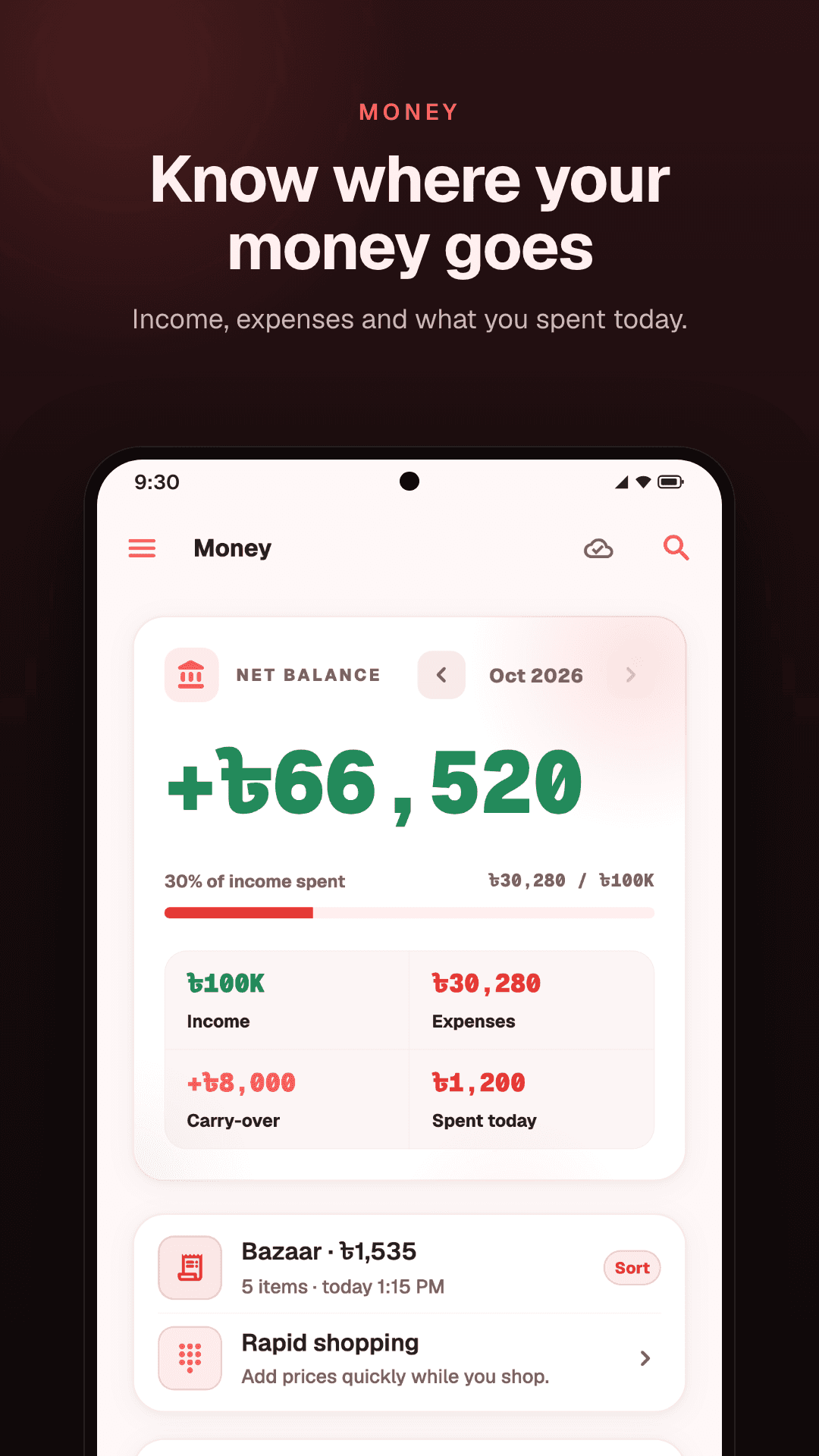
The Money page opens on the month: your balance, income, expenses, and what carried over from last month, with a bar for how much of the month's income is spent. Beside them is what you spent today, so you can tell how the day is going.
Spent today counts everything that left your pocket today. That includes money you lent someone, because it is gone until it comes back.
Today
- Groceries1,200
- Bus fare40
- Lent to Rafi500
Adding
Add a transaction in a few seconds
Type a name and an amount, choose expense or income, and pick an area if you like. Locus suggests names you have used before, so the things you buy often are quick to add again.
The amount field also takes sums like 45 × 3 or 1,200 − 200 and shows the total before you save, on the web and on Android. On Android, a home-screen widget opens a new expense in one tap.
Budgets
A budget for each part of your life
Give an area a budget: monthly for one like Home, yearly for one like Travel, or one budget for all time. Locus adds up what you spend in that area and shows how much is left.
A budget that is nearly used up stands out, so you know which part of your life needs a look before the month ends. Our guide to a monthly budget you will keep shows one way to set them.
Budgets this month
- Home6,200 / 9,000
2,800 left
- Health1,150 / 2,000
850 left
- Fun2,850 / 3,000
150 left
Savings
Savings, kept apart
Record what you put into savings and what you take back out. Locus keeps a running total of what you have saved, apart from the money you spend from day to day.
Lending
Money you lend and borrow
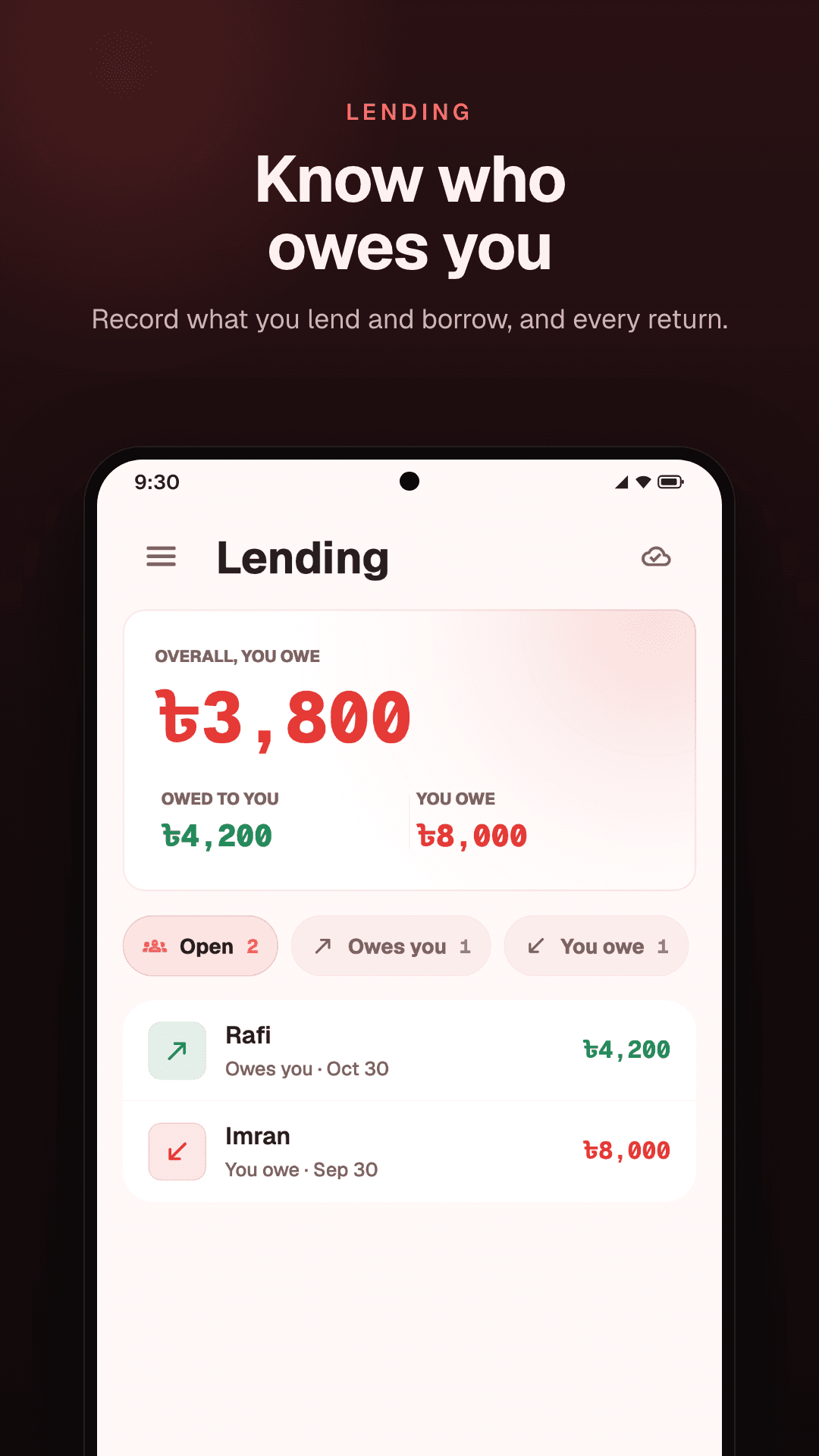
Lent a friend some money? Record it, and record each return as its own entry when it comes back. Locus adds it up for each person and shows who owes you and who you owe.
More on the lending tracker page.
Transactions
Every transaction, in one list
Transactions lists everything in the period you choose, with what came in, what went out and the difference. Search by name, and filter by area. On the web, the list downloads as a CSV file.
Shopping
Shopping trips, added up as you go
Shopping mode turns your phone into a calculator for the shop: type each price, watch the total, and save it to Money in one tap when you are done. See the shopping calculator.
How it works
Start tracking in four steps
- 01
Sign up free
Create an account on the web, or install the Android app. One account works on both.
- 02
Add your income
Record what came in this month, so the balance starts from the real figure.
- 03
Record spending as it happens
Add each expense when you pay, with its area if it has one.
- 04
Check Money
See your balance, what you spent today, and what is left in each budget.
Questions
Common questions
Does Locus connect to my bank?
No. You add each transaction yourself. It takes a few seconds, and you know every entry is right because you made it.
Can I set a budget?
Yes, one for each area: by the month, by the year or for all time. Locus shows how much of each is spent and how much is left.
Does money I lend count as spent?
Yes. Spent today includes money you lent today, because it left your pocket. When it comes back, record a return in Lending.
Can transactions repeat every month?
No. Locus has no repeating transactions, so a bill that comes every month is added each time it is paid.
Can I use it on a computer?
Yes. The web app runs in any browser at locusapp.org and uses the same account as the Android app.
Can I export my transactions?
On the web, yes: the Transactions list downloads as a CSV file.
Keep reading
- Lending trackerMoney you lend and borrow, each return, and who still owes you.
- Shopping calculatorAdd up a shopping trip as you go and save the total in one tap. On Android.
- A budget you will keepA monthly budget built on the parts of your life, and a daily check that keeps it.
- Second brain appMoney, tasks and notes in one place, grouped by the parts of your life.
- Tracking money you lendLend to friends without losing count: what to write down, and how to ask for it back.
- To-do list appTasks with due dates and priorities, as a list, a board or a calendar.
Know where your money goes.
Spending, budgets, savings and lending, on the web and Android.
Free · No ads · On the web and Android